|
 |
Incomplete / Corrupt Download |
|
|
Question / Issue:
I downloaded X from you, but when I tried to run it it said 'file corrupt'
or
I tried to download X, but when I ran it it said 'not a valid .zip archive.'
or
I tried to download and install X, but when I ran it it said 'not a valid win32 application.'
Solution:
Sorry
to hear you're having problems! Most likely, one of two things
is happening:
- The
file on our website is corrupt (highly, highly unlikely) or
we were in the process of uploading a new version of the file
just as you were attempting to download (highly unlikely).
- There
was some glitch with your browser or your ISP during the download process
This is almost certainly what's going on.
Note
that #2 will probably be the case even if you keep trying to download
and get the same results. Why? Because browsers (or ISPSs, without
your knowledge) often cache data in mysterious ways, that, unfortunately,
tend to persist even when you do things that you'd think would
clear them up (like clearing the browser's cache).
Fortunately,
the solution for these kind of problems is pretty straightforward.
- Clear
your browser's cache. In MS Internet Explorer™ click on
"Tools" and then "(Internet) Options" to bring up the Internet Options
dialog box
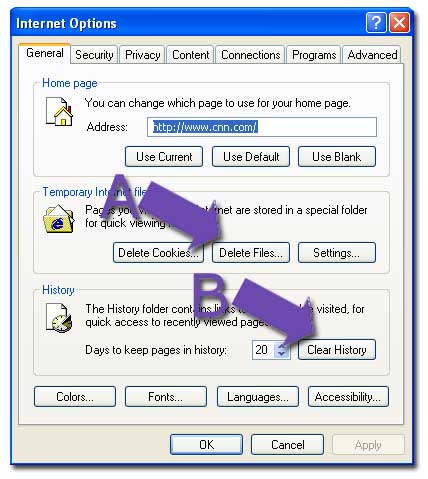
- Click
on "Temporary Internet Files "Delete Files"
and "History "Clear History" as shown below:
- Reboot
your computer
- Restart
the download
If
this doesn't work, try again, adding a step between 3 and 4 as
such:
3.5.
Wait a few hours
This
"wait a few hours" is to allow your ISP's cache to expire,
if there is one.
If
this still doesn't work, do one of the following:
- Try
the download from a different machine. This often solves the
problem.
- Get a "download helper" program. We suggest GetRight (www.getright.com).
GetRight is good at taking care of problems such as incomplete
downloads or modems hanging up with partial downloads.
|
|
|
|
|
|
|
|