



Dauntless support
Check firewall, VPN, and security settings
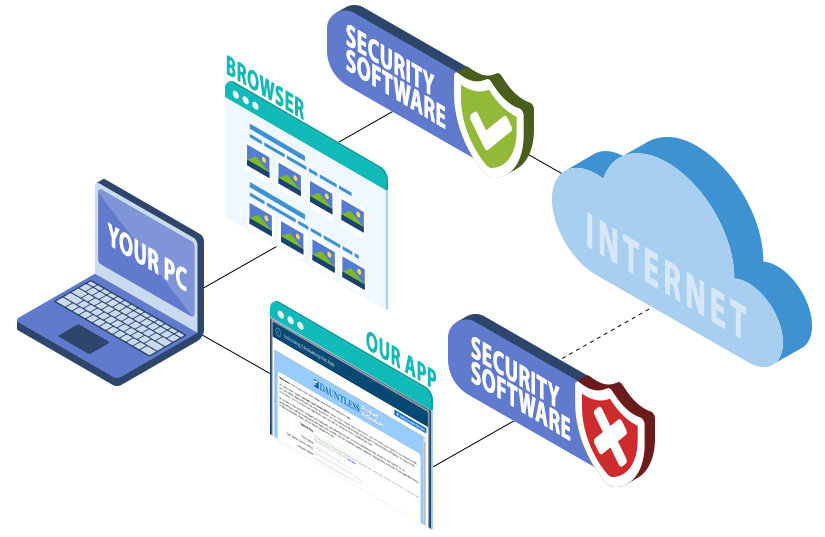
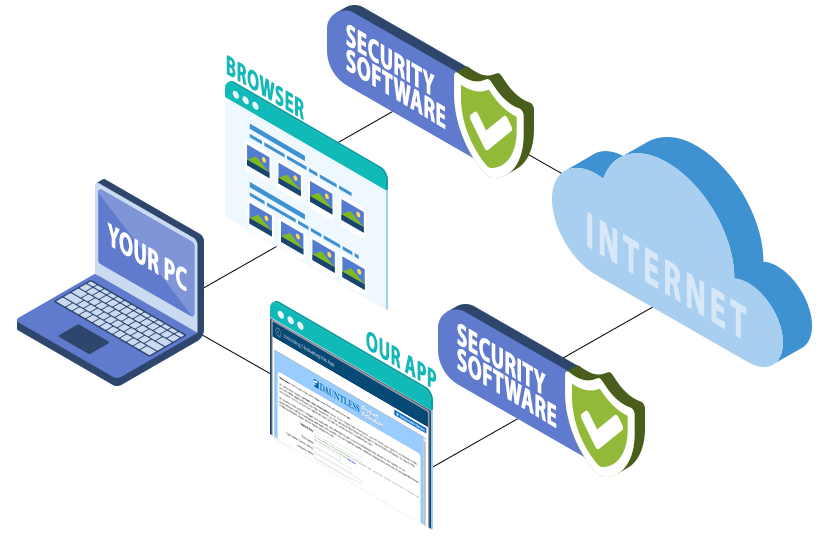
Security software can sometimes block an application's connection even when websites load normally. Possible sources include Windows Firewall, antivirus software, VPNs, security suites, ISP software, or security controls on a workplace network.
The examples below illustrate a browser with access to the internet while the Dauntless application is blocked, and the connection the application needs.
Review the application's connection permissions
- Check which security products and VPNs are running. More than one may be installed, and a workplace network may have additional controls.
- Use the security software's settings to permit the Dauntless application to access the internet. Temporarily disabling the relevant protection is another troubleshooting option; follow the vendor's instructions and restore protection afterward.
- Check whether the vendor requires a restart. A program's window closing does not necessarily stop all of its security components.
- Try activation again. If you need help changing security settings, ask your system administrator, security-software vendor, ISP, or a qualified IT professional.
Our helpdesk can help investigate the activation problem, although we may not be able to configure third-party security software remotely.
Connection note: the activation process usually uses port 80, the standard HTTP port. Filtering can still affect application traffic on that port.
Security software instructions
These searches may help you locate instructions for your installed version. Granting the application the appropriate access is generally preferable to fully disabling security protection.
- Search for instructions to disable McAfee Security Center
- Search for instructions to disable Symantec security software
- Search for instructions to disable Norton security software
- Search for instructions to disable Windows Firewall
- Search for instructions to disable AVG Free
Consult a qualified IT professional for advice specific to your system and network.
* An Activation Code may also be called an Unlock Key, Unlock Keycode, Unlock Code, Keycode, Registration Code, License Key, or Serial Number. The label in your purchase email or software may vary.