 | | | To access the GroundSchool FAA Written Test preparation for PC, please follow these steps: First, make sure you have downloaded and installed the GroundSchool FAA Written Test preparation software for PC. This can be done from this GroundSchool FAA pages. If you have trouble installing the software, you will find a step by step guide to installing the software on this page. In case some of you are notaware, FAA is the United States' Federal Aviation Administration. Once you have installed the software on your PC, you should be able to start the software and you should see a main menu something like this: 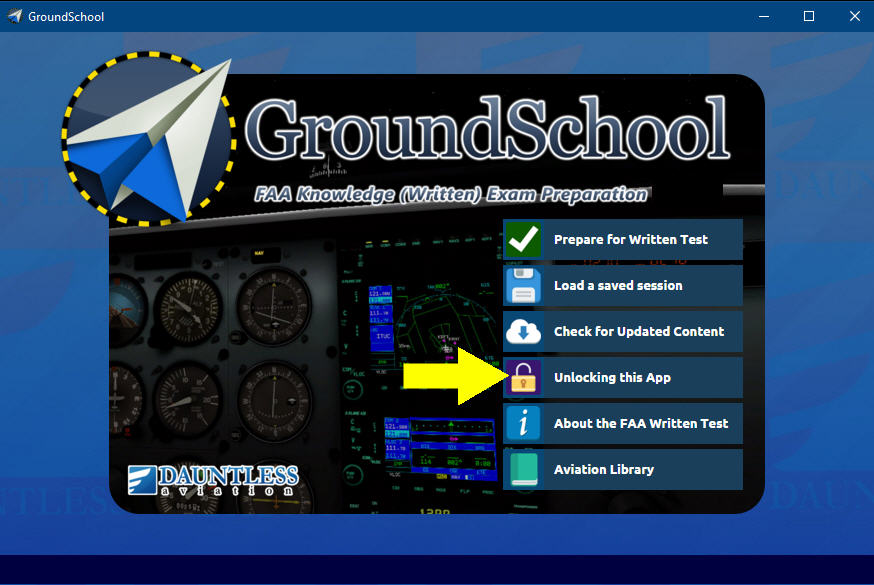 The actual screen may have a different image or otherwise look slightly different, but there are two things of note here: The actual screen may have a different image or otherwise look slightly different, but there are two things of note here: - Check that the title of the software on the main menu says 'GroundSchool' and that the subtitle is something like 'ace your FAA knowledge test.' If it doesn't say this, or the title is something else (like, for example, RideReady) then you are running the WRONG SOFTWARE. Go back to the GroundSchool page and make sure you download and install GroundSchool - FAA.
- If you are indeed running the correct software, there should be a link/button such as 'Unlocking this software' on the main menu. Click on it.
 | Click here to go to the next step |
|
© 2026 Dauntless Aviation • 4950C York Road 110, Buckingham, PA, 18912, USA •
Contact Us •
Privacy Policy / Terms / Conditions
|
|