|
If
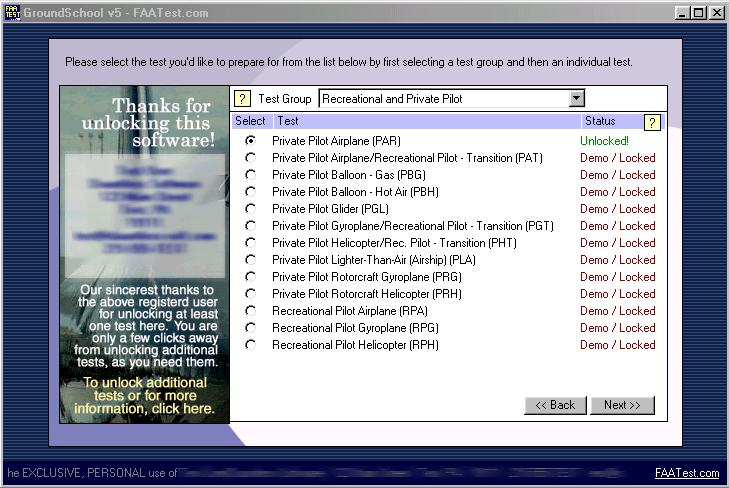
you click on "Prepare for a Written Test" from the main
menu, you come to this screen, the test selection screen.
Our
Version 5 software features support for a far broader range of
tests than ever before. This includes non-airplane tests.
In
this screen, the "Test Group" drop-down at the top allows
you to choose between your test "family," such as Recreational
/ Private Pilot, Instrument Rating, Commercial Pilot, Airline
Transport Pilot, and so forth. When you change this, the corresponding
list of tests below also changes. When available, you simply click
on the radio button (circle) of the test that you are interested
in, and then click on "next" to continue.
Note
that next to each test there is a "status." Our version
5 software allows you to use any of the tests for free in a demo
/ locked mode, where you get access to a fraction of the total
number of questions (and also has some functionality restrictions).
If you unlock a title, you get unrestricted access to that test.
Not
all tests need to be installed on your computer at all times.
The status field will also alert you if you need to install the
data for an additional test (which you can do with a minimum of
fuss using the included LiveUpdate program.)
Note
the yellow help boxes. These are sprinkled liberally throughout
the program. Clicking on them brings up a help screen on the associated
topic.
|